
Lesson 01: Install ModusToolbox
01.1 ModusToolbox Package Selection Guide
Infineon ModusToolbox Installation & Package Selection Guide
When installing Infineon ModusToolbox, your choice of packages depends entirely on your development goals (e.g., which microcontrollers you are using, and whether you are developing for Bluetooth, motor control, or Edge AI applications).
Below is a detailed analysis of each component's functionality and selection recommendations to help you make the best configuration.
Core Development Tools
Core Development Tools
These packages form the foundation of your development environment, containing the Integrated Development Environments (IDEs) and compiler toolchains.
- Eclipse IDE for ModusToolbox
- Function: Infineon's official, customized IDE for ModusToolbox. It features built-in graphical configuration tools (such as Device Configurator and Pins Configurator) that allow you to set MCU parameters visually and automatically generate underlying initialization code.
- Recommendation: Required (unless you plan to develop entirely using VS Code or the command line). Highly recommended for beginners or developers who prefer graphical configurations.
- ZAP tool for ModusToolbox
- Function: ZAP (Zigbee Architecture Product) is a graphical configuration tool for configuring Matter and Zigbee clusters, attributes, and commands.
- Recommendation: Optional. Check this if your project involves smart home IoT protocols like Matter or Zigbee. You can skip it for standard microcontroller (MCU) development.
- Arm GNU Toolchain (GCC)
- Function: The open-source GCC compiler tailored for Arm Cortex-M series processors. It is responsible for compiling your C/C++ source code into machine code that the chip can execute.
- Recommendation: Highly Recommended. This is the default, most widely used, and highly compatible compiler toolchain.
- ModusToolbox Tools Package
- Function: This package contains the fundamental command-line interface (CLI) tools, makefile infrastructure, and standalone graphical configurators (such as the Device Configurator, Smart I/O Configurator, and QSPI Configurator) that form the backbone of the ModusToolbox ecosystem. It is the core engine that handles project creation, build automation, and the generation of hardware abstraction layer (HAL) code.
- Recommendation: Required. This is a mandatory package for all development tracks. Whether you choose to write your code using the official Eclipse IDE, Microsoft Visual Studio Code, or a custom command-line workflow, this package must be installed for any compilation or configuration tool to function.
- LLVM Embedded Toolchain for Arm
- Function: A modern compiler toolchain based on the LLVM/Clang architecture, optimized specifically for embedded Arm systems. Compared to GCC, it can offer better code optimization (reducing code size or boosting performance) and stricter syntax checking in certain scenarios.
- Recommendation: Optional. Check this only if you want to experiment with Clang compilation or if your team has specific LLVM build requirements; otherwise, stick with GCC.
- Microsoft Visual Studio Code
- Function: A highly popular, lightweight code editor. ModusToolbox provides a dedicated VS Code extension pack, allowing you to completely bypass Eclipse and handle project creation, compilation, and debugging directly inside VS Code.
- Recommendation: Optional. Check this if you already use VS Code as your primary editor or prefer a more modern, fluid development experience.
Additional Packages
Additional Packages
These are extension libraries and tools targeted at specific application scenarios (such as audio, motors, security, or machine learning).
Tools & Security
- AIROC Test and Debug Tool
- Function: A tool used for RF testing, wireless debugging, and production line testing of Infineon’s AIROC series Wi-Fi and Bluetooth chips.
- Recommendation: Check this if your hardware target includes Wi-Fi or Bluetooth functionality to streamline your wireless debugging.
- ModusToolbox Edge Protect Security Suite
- Function: Provides cybersecurity-related software modules, including Secure Boot, hardware Root of Trust (RoT), key management, and cryptographic algorithm support.
- Recommendation: Check this if your product requires strict security protection or requires passing IoT security certifications.
- ModusToolbox Programming tools
- Function: Contains essential underlying tools required for flashing firmware and debugging (such as PSoC Programmer, Capsense Tuner, etc.).
- Recommendation: Required. Regardless of your project type, you need these tools to flash code onto your hardware boards.
DEEPCRAFT Series (Edge AI & Audio Processing)
- DEEPCRAFT Model Converter & DEEPCRAFT Studio
- Function: Infineon's Edge AI development ecosystem. The Studio is used for data collection, training, and optimizing machine learning models; the Converter translates trained models (such as TensorFlow Lite) into highly optimized C code suitable for running on resource-constrained MCUs.
- Recommendation: Check these if you need to implement TinyML (Edge Machine Learning) on your microcontroller, such as gesture recognition, anomaly detection, or predictive maintenance.
- DEEPCRAFT Audio Enhancement Tech Pack
- Function: An AI-driven audio processing package featuring machine learning algorithms for Noise Reduction, Acoustic Echo Cancellation (AEC), and voice enhancement.
- Recommendation: Check this when developing smart microphones, intercoms, or voice assistants that require high-quality voice input processing.
Software & Feature Packs
- ModusToolbox Audio SW Codecs Tech Pack
- Function: Traditional audio decoding and encoding software libraries (supporting formats like MP3, AAC, FLAC, SBC, etc.).
- Recommendation: Check this when developing audio playback equipment such as Bluetooth headphones, speakers, or media players.
- ModusToolbox CAPSENSE and Multi-Sense Pack
- Function: The official driver library and tuning tools for Infineon's core CAPSENSE (Capacitive Sensing) technology. It supports touch buttons, sliders, touchpads, and proximity sensing.
- Recommendation: Highly Recommended. If your hardware design uses touch buttons, sliders, or touchscreens, you should absolutely check this.
- ModusToolbox Machine Learning Pack
- Function: A traditional embedded machine learning library (containing optimized math and matrix calculation libraries like CMSIS-NN) to support running lightweight algorithms directly on the MCU.
- Recommendation: Check this if you are using the DEEPCRAFT ecosystem or need to deploy custom TinyML models manually.
- ModusToolbox Motor Suite
- Function: A dedicated motor control software suite supporting Field-Oriented Control (FOC) algorithms and tuning tools for Brushless DC (BLDC) and Permanent Magnet Synchronous Motors (PMSM).
- Recommendation: Check this when developing projects like drone ESCs, fan controllers, or robotic arm motor drives.
- ModusToolbox Power Suite
- Function: A digital power control software pack providing control algorithms, examples, and utility tools for power management, inverters, and DC-DC converters.
- Recommendation: Check this for power electronics projects such as power supplies, EV charging piles, or Battery Management Systems (BMS).
- ModusToolbox Industrial MCU Pack
- Function: A software pack targeted at industrial-grade MCUs (such as the XMC series), containing industrial communication protocols (EtherCAT, Modbus, CAN, etc.) and automation examples.
- Recommendation: Check this if you are developing industrial automation equipment, PLCs, or automotive CAN communication nodes.
- ModusToolbox Smart Induction Cooktop Pack
- Function: A complete turnkey solution package tailored for smart induction cooktop appliances, integrating heating control, safety mechanisms, and user interface layouts.
- Recommendation: Skip this unless you are specifically designing an induction cooktop or related induction-heating household appliances.
🎯 Tailored Selection Guide for PSoC 6 Hardware
If you are developing specifically with the following PSoC 6 dual-core (Arm Cortex-M4 + Cortex-M0+) hardware kits, your focus will naturally lean toward Wireless Communication (BLE), Low Power, Edge AI, and Capacitive Touch.
- CY8CKIT-062S2-AI: Tailored for Edge AI and machine learning, featuring onboard hardware acceleration and sensors.
- CY8CPROTO-063-BLE: Tailored for Low-Power Bluetooth (BLE) prototyping.
You can streamline your installation footprint significantly by selecting only the packages below:
Recommended Checklist
- Core Tools (Mandatory)
- [x] Eclipse IDE for ModusToolbox [2026.3.0] (Essential graphical configuration and project management environment)
- [x] Arm GNU Toolchain (GCC) [1.4.2.1] (The standard compiler for PSoC 6 architectures)
- [x] ModusToolbox Tools Package [3.8.0] (Absolute core engine required for code generation, build tools, and hardware configuration)
- [x] Microsoft Visual Studio Code (Recommended if you prefer writing code in VS Code while leveraging ModusToolbox build tools; optional if you stick strictly to Eclipse)
- Edge AI Packages (Crucial for CY8CKIT-062S2-AI)
To leverage the hardware machine learning capabilities of the AI development board, select:- [x] DEEPCRAFT Model Converter (Converts trained ML models into optimized C code for PSoC 6)
- [x] DEEPCRAFT Studio (Used for sensor data collection, model design, and optimization)
- [x] ModusToolbox Machine Learning Pack (Provides underlying neural network and matrix acceleration libraries like CMSIS-NN)
- Wireless Packages (Crucial for CY8CPROTO-063-BLE)
Because this prototyping board features an onboard BLE module, select:- [x] AIROC Test and Debug Tool (Essential for debugging RF performance and checking Bluetooth protocol stack status)
- Hardware Support & Feature Packages (Highly Recommended)
- [x] ModusToolbox Programming tools (Mandatory toolset containing PSoC Programmer and underlying drivers required to flash and debug hardware)
- [x] ModusToolbox CAPSENSE and Multi-Sense Pack (Highly recommended. Proprietary capacitive touch is a primary feature of PSoC 6 chips; this package grants access to the graphic tuning software and touch driver libraries)
❌ Packages You Can Safely Uncheck
The following packages do not match the hardware features or standard use cases of your PSoC 6 kits and can be left unchecked to save disk space:
- ZAP tool for ModusToolbox (Mainly for Matter/Zigbee; your boards primarily use standard BLE)
- LLVM Embedded Toolchain for Arm (Standard GCC is perfectly sufficient)
- DEEPCRAFT Audio Enhancement / Audio SW Codecs Tech Pack (Not needed unless you attach an external high-end microphone or dedicated audio codec chip)
- ModusToolbox Industrial MCU Pack (Intended for XMC industrial MCUs)
- ModusToolbox Motor Suite / Power Suite / Smart Induction Cooktop Pack (Designed for heavy power electronics, motor drives, or home appliances)
- ModusToolbox Edge Protect Security Suite (Advanced Secure Boot/Root-of-Trust configuration; can be omitted for initial lab work, teaching, or prototyping phases)
01.2 Infineon ModusToolbox Installation
01.3 Workspace
What is a Workspace in ModusToolbox?
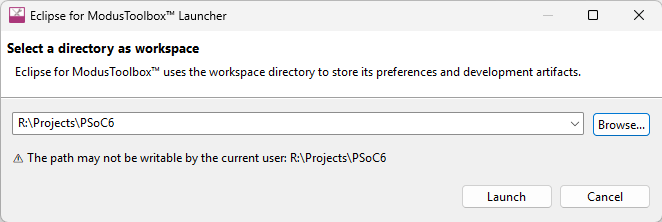
In Eclipse-based environments like ModusToolbox, a Workspace is a dedicated management directory. Instead of just being a standard folder where your source code lives, it acts as the "control center" for your development session.
A workspace stores two primary types of data:
- Your Projects: The actual source code, libraries, Makefiles, and asset configurations for your PSoC 6 designs.
- IDE Metadata (.metadata): A hidden folder where Eclipse saves your personal environment preferences, window layouts, perspective settings, compiler path mappings, and recent project history.
How to Configure Your Workspace Directory
Since your primary project directory is R:\Projects\PSoC6, you have two practical strategies for setting up your workspace:
Option A: Use R:\Projects\PSoC6 directly as the Workspace (Recommended)
You can point the launcher directly to your main folder. ModusToolbox will generate a hidden .metadata folder right alongside your individual project subfolders (e.g., R:\Projects\PSoC6\Project_1, R:\Projects\PSoC6\Project_2).
- Pros: Clean and unified. When you open this workspace, all PSoC 6 projects contained within that root directory can be managed together smoothly.
Option B: Separate Workspace Metadata from Projects
You can create a dedicated metadata directory, such as R:\Projects\PSoC6_Workspace, and point the launcher there. Inside the IDE, you can then import or create projects that physically sit inside R:\Projects\PSoC6.
- Pros: Keeps your actual source code folder clean of IDE-specific hidden configuration files.
💡 Best Practice Tip for Version Control: If you use Git or another version control system for your classes or labs, ensure that the hidden .metadata folder generated by Eclipse is added to your .gitignore file. Metadata contains absolute local file paths specific to your computer workstation, which can cause conflicts when shared with others.
Should You Check "Use this as the default and do not ask again"?
Yes, you should check it, provided you plan to keep all your current and future PSoC 6 coursework and developer branches under that directory path.
- Why you should check it: It bypasses the prompt on every subsequent launch, speeding up your startup workflow directly into your coding environment.
- What if you change your mind later? Checking this box does not lock you in permanently. If you ever need to create a brand new workspace for a different chip family or a separate class layout, you can easily switch or re-enable the prompt from inside the IDE menu:
File → Switch Workspace → Other...
01.4 Board Support Package (BSP) and Template Applications
What is a Board Support Package (BSP) in ModusToolbox?
In ModusToolbox, a Board Support Package (BSP) is a standardized software layer that acts as a bridge between your application code and your specific hardware board. It provides a clean abstraction so you don't have to manually map registers, clocks, or pins every time you start a new project.
A BSP typically bundles together three main components:
- Hardware Configuration Files: Pre-configured settings for the specific MCU architecture on the board (clocks, power rails, default peripherals).
- Pin Mapping Definitions: Friendly symbolic names for the physical pins on that exact kit (e.g., instead of tracking that an onboard LED is connected to P12_1, the BSP lets you reference CYBSP_USER_LED).
- Startup and Initialization Code: The firmware files that run immediately at boot to initialize the system memory, clocks, and internal buses before jumping to your main() function.
When you create a project for your CY8CKIT-062S2-AI or CY8CPROTO-063-BLE boards, ModusToolbox pulls in their respective official BSPs, so all hardware features are ready to use immediately out of the box.
Why PSoC Creator Does Not Have This Setting
If you have worked with PSoC Creator (the legacy IDE for older PSoC 3, 4, and 5LP devices), you won't find a "BSP" option. The two development ecosystems handle hardware configuration with fundamentally different philosophies:
| Feature / Philosophy | PSoC Creator (Legacy) | ModusToolbox (Modern Ecosystem) | ||
| Design Approach | Chip-Centric (Schematic-Driven) | Board-Centric (Software-Driven) | ||
| Target Audience | Hardware/Analog Engineers | Firmware/Embedded Software Engineers | ||
| Configuration Style | Graphical Schematic Capture (Placing schematic components like op-amps, gates, and UDBs onto a blank canvas) | Standard C-code configurations managed by modular GUI tools (Device Configurator) | ||
| Portability | Harder to port code; changing a chip model often breaks schematic connections and requires a total redraw | Highly portable; changing target hardware often just means swapping the underlying BSP folder | ||
| IDE Dependency | Monolithic; you must write code, compile, and route entirely inside PSoC Creator | Flexible; configurations compile via a standard Makefile mechanism, letting you use any IDE (Eclipse, VS Code, etc.) |
The Structural Difference:
- PSoC Creator treats everything as a custom silicon chip design. When you started a project in Creator, you didn't choose a board; you chose a raw part number. You then built your own "board support" by dragging components onto a schematic sheet, assigning pins in a .cydwr file, and letting the proprietary Cypress compiler route the physical connections to the silicon.
- ModusToolbox treats hardware like modern standard MCUs. Modern PSoC 6 devices are much more complex, featuring dual-core processing (Cortex-M4 + Cortex-M0+) and fixed architectural blocks. Rather than forcing you to route the internal silicon lines, ModusToolbox uses the BSP to supply pre-built configuration files. This decouples the silicon configuration from the IDE, enabling projects to be cross-platform, modular, and compatible with industry-standard software workflows.
Template Applications
After you select your Board Support Package (BSP), the ModusToolbox Project Creator knows exactly what hardware you are holding in your hand. The next step is choosing a Template Application, which tells the system what kind of project you want to build.
The purpose of the Template Application is to provide a functional, pre-configured starting point (boilerplate code) so you don't have to write a complex embedded application completely from scratch.
The Purpose and Benefits of Template Applications
- Eliminates Boilerplate Code
Setting up dual-core MCUs (such as the Cortex-M4 and Cortex-M0+ on your PSoC 6 kits) requires initializing inter-processor communication, configuring the default system clocks, and establishing power management regimes. A template automatically handles this initial setup, letting you jump straight into your actual application logic. - Provides Verified Hardware Examples
Templates serve as official reference designs. If you choose a template for a specific feature, Infineon has already verified that the pins, drivers, and software libraries match the peripherals on your selected BSP. - Speeds Up the Learning Curve
Instead of reading hundreds of pages of reference manuals to figure out how to initialize a specific block, you can open a template, see a working implementation, and modify or copy the code for your own labs and projects.
ModusToolbox Template Applications — Detailed Descriptions
Bluetooth
Bluetooth
This group contains applications for wireless communication using the Bluetooth Low Energy (BLE) protocol, including GATT services and beaconing.
| Template Application | New Application Name | Descriptions |
| ☐ Bluetooth LE CTS Client | Bluetooth_LE_CTS_Client | A Bluetooth® LE GATT client example implementing the Current Time Service (CTS). The device connects to a CTS server and reads current date/time information over Bluetooth® LE. Useful for learning BLE central/client operations and GATT service discovery. |
| ☐ Bluetooth LE CTS Server | Bluetooth_LE_CTS_Server | A Bluetooth® LE GATT server example implementing the Current Time Service (CTS). The device advertises time information and allows connected clients to read or synchronize their clocks. Useful for learning BLE peripheral/server development. |
| ☐ Bluetooth LE Battery Client | Bluetooth_LE_Battery_Client | Demonstrates a Bluetooth® LE GATT client implementing the Battery Service profile. The device connects to a BLE battery server and reads battery-level information from a remote device. |
| ☐ Bluetooth LE Battery Server | Bluetooth_LE_Battery_Server | Demonstrates a Bluetooth® LE GATT server implementing the Battery Service profile. The device advertises battery-level information and allows connected BLE clients to monitor battery status. |
| ☐ Bluetooth LE Environmental Sensing Service | Bluetooth_LE_Environmental_Sensing_Service | Demonstrates a Bluetooth® LE Environmental Sensing profile that transmits simulated environmental data, such as temperature, to connected BLE clients. Useful for sensor-monitoring and IoT applications. |
| ☐ Bluetooth LE Findme | Bluetooth_LE_Findme | Demonstrates the Bluetooth® LE Find Me Profile (FMP) using the Immediate Alert Service (IAS). A connected client can trigger alerts, such as LEDs or buzzer indications, to help locate the device. |
| ☐ Bluetooth LE Hello Sensor | Bluetooth_LE_Hello_Sensor | A basic Bluetooth® LE custom GATT service example with security support. The project demonstrates BLE advertising, connections, notifications, and custom sensor/LED control operations. Commonly used as an introductory BLE template in ModusToolbox™. |
| ☐ Bluetooth LE Multi Beacon | Bluetooth_LE_Multi_Beacon | Demonstrates BLE beacon broadcasting using both iBeacon and Eddystone advertisement formats. Useful for location-aware applications, proximity detection, and beacon-based IoT systems. |
| ☐ Bluetooth LE Peripheral Privacy | Bluetooth_LE_Peripheral_Privacy | Demonstrates Bluetooth® LE privacy features introduced in BLE 5.x, including private/random addresses and privacy protection mechanisms for BLE peripherals. Useful for secure wireless device implementations. |
| ☐ Wi-Fi Onboarding Using Bluetooth LE | Wi-Fi_Onboarding_Using_Bluetooth_LE | Demonstrates how Bluetooth® LE can be used to provision Wi-Fi credentials to a device. A mobile app connects through BLE, sends SSID/password information, and allows the device to join a Wi-Fi network without manual configuration. |
Getting Started
Getting Started
These templates provide the essential "Hello World" or bare-metal configurations needed to begin developing on the PSoC 6 architecture.
| Template Application | New Application Name | Descriptions |
| ☐ Dual-CPU Empty PSOC6 App | Dual-CPU_Empty_PSOC6E_App | A minimal dual-core PSoC™ 6 application template for projects using both the Cortex®-M4 and Cortex®-M0+ CPUs. Provides the basic startup structure, linker configuration, and inter-core project framework for custom dual-core development. |
| ☐ Empty App | Empty_App | A blank single-core application template with only the essential initialization code. Intended as a clean starting point for creating custom embedded applications from scratch. |
| ☐ Hello World | Hello_World | A simple introductory example demonstrating UART serial output, LED control, and basic firmware execution. Typically prints “Hello World” messages to a terminal while blinking an onboard LED. |
| ☐ Switching Power Modes | Switching_Power_Modes | Demonstrates how to transition the PSoC™ 6 device between different power modes such as Active, Sleep, Deep Sleep, and Hibernate. Useful for learning low-power embedded system design and energy optimization techniques. |
Machine Learning
Machine Learning
A collection of AI/ML template projects for PSoC™ 6 and AI evaluation kits. These examples demonstrate sensor data collection, TinyML model deployment, audio/motion/radar inference, and cloud-connected AI applications using ModusToolbox.
| Template Application | New Application Name | Descriptions |
| ☐ Avnet IoTConnect Al Baby Monitor Example | Avnet_loTConnect_Al_Baby_Monitor_Example | Demonstrates an AI-based baby monitoring application using audio/event detection and cloud connectivity through Avnet IoTConnect™. Useful for smart monitoring and edge AI demonstrations. |
| ☐ Avnet IoTConnect Al IMU Example | Avnet_loTConnect_Al_IMU_Example | Demonstrates machine learning inference using IMU (accelerometer/gyroscope) sensor data. The project performs motion/activity recognition and integrates with Avnet IoTConnect™ cloud services. |
| ☐ Avnet loTConnect Imagimob Ready Model | Avnet_loTConnect_Imagimob_Ready_Model | Demonstrates deployment of a pre-trained Imagimob AI model integrated with Avnet IoTConnect™ for rapid edge AI prototyping and cloud-connected inference applications. |
| ☐ DEEPCRAFT Deploy Model Audio | DEEPCRAFT_Deploy_Model_Audio | Demonstrates deployment of a trained TinyML audio classification model using DEEPCRAFT™ tools. Typical applications include keyword spotting, sound detection, and voice-triggered systems. |
| ☐ DEEPCRAFT Deploy Model Motion | DEEPCRAFT_Deploy_Model_Motion | Demonstrates deployment of a motion-recognition machine learning model using IMU sensor data. Useful for gesture recognition, activity tracking, and motion analytics. |
| ☐ DEEPCRAFT Deploy Model Radar | DEEPCRAFT_Deploy_Model_Radar | Demonstrates deployment of radar-based AI models for object detection, motion sensing, or presence recognition using radar sensor data. |
| ☐ DEEPCRAFT Deploy Ready Model | DEEPCRAFT_Deploy_Ready_Model | Demonstrates how to quickly deploy a prebuilt DEEPCRAFT™ TinyML model onto supported hardware platforms without performing custom training. |
| ☐ DEEPCRAFT Streaming Protocol | DEEPCRAFT_Streaming_Protocol | Demonstrates real-time sensor data streaming between hardware and AI development tools using the DEEPCRAFT™ streaming protocol for model training and debugging workflows. |
| ☐ Machine Learning Imagimob Data Collection | Machine_Learning_Imagimob_Data_Collection | Demonstrates sensor data acquisition and streaming for collecting training datasets used in Imagimob Studio™ machine learning workflows. |
| ☐ Machine Learning Imagimob MTBML Deploy | Machine_Learning_Imagimob_MTBML_Deploy | Demonstrates deployment of Imagimob-trained machine learning models using the ModusToolbox™ Machine Learning (MTBML) framework for embedded AI inference. |
| ☐ Machine Learning Neural Network Profiler | Machine_Learning_Neural_Network_Profiler | Demonstrates performance profiling and benchmarking of neural network models on embedded hardware, including memory usage, execution time, and inference efficiency analysis. |
Manufacturing
Manufacturing
A collection of manufacturing and production-test template applications intended for factory validation, wireless calibration, and device verification during mass production.
| Template Application | New Application Name | Descriptions |
| ☐ Tester - Wi-Fi MFG Tool | Tester_-_Wi-Fi_MFG_Tool | A Wi-Fi manufacturing test utility designed for production-line testing and RF verification. The project is used to validate Wi-Fi functionality, perform calibration, measure RF performance, and verify wireless communication during device manufacturing and quality assurance processes. |
Peripherals
Peripherals
A collection of peripheral-interface and hardware abstraction layer (HAL) examples demonstrating how to use common PSoC™ 6 peripherals, middleware, cryptographic functions, RTOS integration, and embedded hardware interfaces.
| Template Application | New Application Name | Descriptions |
| ☐ ADC basic | ADC_basic | Demonstrates basic Analog-to-Digital Converter (ADC) operation for reading analog voltage signals and converting them into digital values. |
| ☐ Basic Device Firmware Upgrade | Basic_Device_Firmware_Upgrade | Demonstrates a basic firmware update mechanism that allows an embedded device to receive and install new application firmware images. |
| ☐ Class-B Analog peripherals | Class-B_Analog_peripherals | Demonstrates safety diagnostic tests for analog peripherals in compliance with IEC 60730 Class B functional safety requirements. |
| ☐ Class-B Communication protocol | Class-B_Communication_protocol | Demonstrates communication integrity and diagnostic techniques used for Class B functional safety applications. |
| ☐ Class-B Core peripherals | Class-B_Core_peripherals | Demonstrates self-test and monitoring methods for CPU core peripherals required in Class B safety-certified systems. |
| ☐ Class-B DAC test | Class-B_DAC_test | Demonstrates diagnostic and verification testing for DAC peripherals under IEC 60730 Class B safety requirements. |
| ☐ Class-B I2C peripheral | Class-B_I2C_peripheral | Demonstrates functional safety verification techniques for I²C peripheral communication interfaces. |
| ☐ Class-B SPI loopback | Class-B_SPI_loopback | Demonstrates SPI loopback testing for verifying SPI communication integrity in functional safety applications. |
| ☐ Class-B Stack test FreeRTOS | Class-B_Stack_test_FreeRTOS | Demonstrates stack-monitoring and diagnostic methods for FreeRTOS™-based Class B safety systems. |
| ☐ Class-B TCPWM peripheral | Class-B_TCPWM_peripheral | Demonstrates testing and diagnostic techniques for Timer/Counter/PWM peripherals in Class B functional safety applications. |
| ☐ Class-B UART loopback | Class-B_UART_loopback | Demonstrates UART loopback communication tests for validating serial-interface reliability in safety-critical systems. |
| ☐ Cryptography AES Demonstration | Cryptography_AES_Demonstration | Demonstrates hardware- and software-based AES encryption and decryption for secure embedded communication and data protection. |
| ☐ Cryptography SHA Demonstration | Cryptography_SHA_Demonstration | Demonstrates SHA hashing functions used for data integrity verification and secure authentication applications. |
| ☐ Cryptography TRNG Demonstration | Cryptography_TRNG_Demonstration | Demonstrates the use of the hardware True Random Number Generator (TRNG) for cryptographic security and random-data generation. |
| ☐ CSD Current DAC | CSD_Current_DAC | Demonstrates current DAC generation using the CapSense® Sigma-Delta (CSD) hardware block for analog signal applications. |
| ☐ CSDADC | CSDADC | Demonstrates analog-to-digital conversion using the CapSense® Sigma-Delta (CSD) hardware block configured as an ADC. |
| ☐ Dual-CPU IPC Pipes | Dual-CPU_IPC_Pipes | Demonstrates inter-processor communication (IPC) using pipe-based message passing between the Cortex®-M4 and Cortex®-M0+ CPUs. |
| ☐ Dual-CPU IPC Semaphore | Dual-CPU_IPC_Semaphore | Demonstrates synchronization and resource sharing between dual CPUs using IPC semaphore mechanisms. |
| ☐ emFile Filesystem | emFile_Filesystem | Demonstrates embedded file system operations such as file creation, reading, writing, and storage management using the SEGGER emFile middleware. |
| ☐ Emulated EEPROM | Emulated_EEPROM | Demonstrates EEPROM emulation using flash memory to store persistent configuration or application data. |
| ☐ Fault Handling | Fault_Handling | Demonstrates detection and handling of processor faults and runtime exceptions for improving system robustness and debugging. |
| ☐ Free-Running Multi-Counter Watchdog Timer | Free-Running_Multi-Counter_Watchdog_Timer | Demonstrates advanced watchdog timer configurations using multiple counters for system monitoring and fault recovery. |
| ☐ GPIO Pins | GPIO_Pins | Demonstrates basic General-Purpose Input/Output (GPIO) control, including reading switches/buttons and controlling LEDs or digital output pins. |
| ☐ HAL FreeRTOS-POSIX Demo | HAL_FreeRTOS-POSIX_Demo | Demonstrates integration of the Hardware Abstraction Layer (HAL), FreeRTOS™, and POSIX-compatible APIs for multitasking embedded applications. |
| ☐ HAL GPIO Interrupt | HAL_GPIO_Interrupt | Demonstrates GPIO interrupt handling for detecting button presses or external signal changes using interrupt service routines (ISR). |
| ☐ HAL I2C Master | HAL_I2C_Master | Demonstrates I²C master communication for controlling or reading external peripheral devices such as sensors and EEPROMs |
| ☐ HAL I2C Slave | HAL_I2C_Slave | Demonstrates I²C slave device implementation, allowing the PSoC™ device to respond to commands from an external I²C master. |
| ☐ HAL Low-Power Timer | HAL_Low-Power_Timer | Demonstrates low-power timer functionality for periodic wakeup events and energy-efficient timing applications. |
| ☐ HAL PWM Square Wave | HAL_PWM_Square_Wave | Demonstrates Pulse Width Modulation (PWM) generation for creating square-wave outputs used in LED dimming, motor control, and signal generation. |
| ☐ HAL RTC periodic wakeup | HAL_RTC_periodic_wakeup | Demonstrates periodic wakeup events using the Real-Time Clock (RTC) through the Hardware Abstraction Layer (HAL) for low-power applications. |
| ☐ HAL SPI Master | HAL_SPI_Master | Demonstrates SPI master communication with external SPI devices such as displays, sensors, or memory modules. |
| ☐ HAL TCPWM Timer | HAL_TCPWM_Timer | Demonstrates the use of the TCPWM (Timer/Counter/PWM) peripheral through the Hardware Abstraction Layer (HAL) for timing, periodic interrupts, and event scheduling applications. |
| ☐ HAL Watchdog Timer | HAL_Watchdog_Timer | Demonstrates watchdog timer functionality used to automatically recover the system from firmware lockups or unexpected failures. |
| ☐ I2C Master EzI2C Slave | I2C_Master_EzI2C_Slave | Demonstrates communication between an I²C master device and a PSoC™ EzI2C slave interface. Useful for learning simplified I²C slave implementations and host-device data exchange. |
| ☐ I2C Slave Using Callbacks | I2C_Slave_Using_Callbacks | Demonstrates an I²C slave implementation using callback functions to handle communication events such as read/write requests and transfer completion. |
| ☐ I2S Audio | I2S_Audio | Demonstrates digital audio transmission using the I²S (Inter-IC Sound) interface for audio playback or streaming applications. |
| ☐ I2S Master using Smart IO and SPI | I2S_Master_using_Smart_IO_and_SPI | Demonstrates implementation of an I²S master interface using Smart I/O logic combined with the SPI peripheral to generate digital audio communication signals. |
| ☐ Littlefs Filesystem | Littlefs_Filesystem | Demonstrates the LittleFS embedded filesystem for NOR flash memory, featuring wear leveling, power-loss resilience, and lightweight storage management. |
| ☐ LZ4 compression and decompression demo | LZ4_compression_and_decompression_demo | Demonstrates high-speed LZ4 data compression and decompression techniques for reducing storage size and improving embedded data-transfer efficiency. |
| ☐ MCUboot-Based Basic Bootloader | MCUboot-Based_Basic_Bootloader | Demonstrates a secure bootloader implementation using MCUboot, including firmware image validation and secure application update mechanisms. |
| ☐ PDM PCM Audio | PDM_PCM_Audio | Demonstrates audio capture using a PDM microphone and conversion into PCM audio data for digital audio processing applications. |
| ☐ PDM to I2S Audio | PDM_to_I2S_Audio | Demonstrates converting audio captured from a PDM microphone into I²S digital audio output for playback or external audio-device interfacing. |
| ☐ Protection Units FreeRTOS | Protection_Units_FreeRTOS | Demonstrates memory protection and access-control mechanisms using hardware protection units in a FreeRTOS™ multitasking environment. |
| ☐ Ramping LED using SmartIO | Ramping_LED_using_SmartIO | Demonstrates LED brightness ramping effects using Smart I/O hardware logic and PWM signal control. |
| ☐ RTC alarm interrupt | RTC_alarm_interrupt | Demonstrates Real-Time Clock (RTC) alarm functionality and interrupt handling for scheduled wake-up or timed-event applications. |
| ☐ RTC Basics | RTC_Basics | Demonstrates basic Real-Time Clock (RTC) configuration and operation, including timekeeping and calendar functions. |
| ☐ SCB SPI Master DMA | SCB_SPI_Master_DMA | Demonstrates SPI master communication using the Serial Communication Block (SCB) with DMA support for efficient high-speed data transfer. |
| ☐ SCB UART Transmit and Receive using DMA | SCB_UART_Transmit_and_Receive_using_DMA | Demonstrates UART communication using DMA-based transmit and receive operations to reduce CPU overhead and improve communication efficiency. |
| ☐ SGPIO Target Interface | SGPIO_Target_Interface | Demonstrates the use of Smart GPIO (SGPIO) interfaces for custom digital signaling, programmable I/O behavior, or target communication applications. |
| ☐ Serial Flash Read Write | Serial_Flash_Read_Write | Demonstrates reading and writing operations to external serial flash memory devices using standard serial communication interfaces. |
| ☐ Sine wave using VDAC | Sine_wave_using_VDAC | Demonstrates generation of analog sine-wave signals using the Voltage DAC (VDAC) peripheral for waveform synthesis and signal-generation applications. |
| ☐ UART Transmit and Receive | UART_Transmit_and_Receive | Demonstrates UART serial communication, including transmitting and receiving data between the PSoC™ device and external systems such as PCs or microcontrollers. |
Security
Security
A collection of security-oriented examples demonstrating secure embedded-system design, cryptographic protection, secure storage, authentication, and trusted firmware operation on PSoC™ platforms.
| Template Application | New Application Name | Descriptions |
| ☐ security App | Security_App | Demonstrates basic embedded security features such as secure data handling, cryptographic operations, authentication mechanisms, and protected firmware execution within a PSoC™ application. |
Sensing
Sensing
A collection of sensor-processing and intelligent sensing examples demonstrating radar, motion sensing, sensor fusion, and real-time signal processing using PSoC™ 6 AI kits and XENSIV™ sensors.
| Template Application | New Application Name | Descriptions |
| ☐ CYBCKIT-062S2-Al - BGT60TR13C radar DSP | CY8CKIT-06252-Al_-_BGT60TR13C_radar_DSP | Demonstrates digital signal processing (DSP) techniques using the XENSIV™ BGT60TR13C 60 GHz radar sensor. The project processes radar signals for motion, distance, or presence detection applications. |
| ☐ CYBCKIT-062S2-Al Radar Fusion GUI | CY8CKIT-06252-Al_Radar_Fusion_GUI | Demonstrates radar sensor fusion with a PC-based graphical user interface (GUI). The example visualizes radar data, target detection, and real-time sensing results. |
| ☐ Motion Sensor over I2C FreeRTOS | Motion_Sensor_over_|2C_FreeRTOS | Demonstrates motion-sensor communication over the I²C interface using FreeRTOS™ multitasking. Useful for learning real-time sensor acquisition and RTOS-based embedded system design. |
| ☐ Rutronik CYBCKIT-062S2-Al Radar Gesture | Rutronik_CY8CKIT-06252-Al_Radar_Gesture | Demonstrates gesture-recognition applications using a 60 GHz radar sensor on the CY8CKIT-062S2-AI platform. The system detects hand motions and interprets predefined gestures. |
| ☐ XENSIV 60GHz Radar Presence Detection | XENSIV_60GHz_Radar_Presence_Detection | Demonstrates human presence detection using the XENSIV™ 60 GHz radar sensor. The project can detect occupancy, motion, or nearby human activity for smart-home and IoT sensing applications. |
Wi-Fi
Wi-Fi
A collection of Wi-Fi networking examples demonstrating wireless communication, cloud connectivity, secure networking, OTA firmware updates, low-power operation, and TCP/UDP/MQTT/HTTPS protocols using Infineon Wi-Fi solutions.
| Template Application | New Application Name | Descriptions |
| ☐ Avnet loTConnect Basic Example | Avnet_loTConnect_Basic_Example | Demonstrates basic cloud connectivity using Avnet IoTConnect™ over Wi-Fi for IoT telemetry and remote device communication. |
| ☐ OTA Using MQTT | OTA_Using_MQTT | Demonstrates Over-The-Air (OTA) firmware updates using the MQTT protocol. The device downloads and installs firmware updates over a network connection. |
| ☐ Tester - Wi-Fi Cert Tool | Tester_-_Wi-Fi_Cert_Tool | A Wi-Fi certification and validation utility used for wireless testing, RF verification, and regulatory certification processes. |
| ☐ Wi-Fi HTTPS Client | Wi-Fi_HTTPS_Client | Demonstrates secure HTTPS client communication over Wi-Fi, including encrypted web requests and TLS/SSL connectivity. |
| ☐ Wi-Fi HTTPS Server | Wi-Fi_HTTPS_Server | Demonstrates hosting a secure HTTPS web server on the embedded device, allowing encrypted browser-based communication. |
| ☐ Wi-Fi MQTT Client | Wi-Fi_MQTT_Client | Demonstrates MQTT publish/subscribe communication over Wi-Fi for cloud-connected IoT applications and message-based data exchange. |
| ☐ Wi-Fi Scan | Wi-Fi_Scan | Demonstrates scanning for nearby wireless access points and displaying Wi-Fi network information such as SSID, RSSI, and security type. |
| ☐ Wi-Fi Secure TCP client | Wi-Fi_Secure_TCP_client | Demonstrates encrypted TCP client communication using TLS/SSL over Wi-Fi for secure socket-based networking. |
| ☐ Wi-Fi Secure TCP server | Wi-Fi_Secure_TCP_server | Demonstrates encrypted TCP server communication using TLS/SSL, allowing secure client-device communication sessions. |
| ☐ Wi-Fi TCP Client | Wi-Fi_TCP_Client | Demonstrates standard TCP client communication over Wi-Fi for reliable socket-based data transfer. |
| ☐ Wi-Fi TCP Server | Wi-Fi_TCP_Server | Demonstrates standard TCP server functionality, allowing external devices or PCs to connect and exchange data with the embedded system. |
| ☐ Wi-Fi UDP Client | Wi-Fi_UDP_Client | Demonstrates UDP client communication over Wi-Fi for lightweight and low-latency data transmission. |
| ☐ Wi-Fi UDP Server | Wi-Fi_UDP_Server | Demonstrates UDP server functionality for receiving and responding to UDP network packets. |
| ☐ WLAN Low Power | WLAN_Low_Power | Demonstrates low-power Wi-Fi operation and power-management techniques for battery-powered wireless embedded devices. |
| ☐ WLAN Offloads | WLAN_Offloads | Demonstrates hardware-assisted WLAN offloading features that reduce MCU workload by allowing the Wi-Fi hardware to manage certain networking tasks. |
| ☐ WPS Enrollee | WPS_Enrollee | Demonstrates Wi-Fi Protected Setup (WPS) client functionality for simplified wireless network configuration and secure AP connection. |
Recommended ModusToolbox Template Applications by Scenario
Single-Core Applications (Cortex-M0+ or Simple Embedded Systems)
Recommended for:
- Beginner embedded systems courses
- Simple sensor/control systems
- Low-power standalone applications
- Basic firmware development
Recommended templates:
- Empty_App
- Hello_World
- GPIO_Pins
- HAL_GPIO_Interrupt
- HAL_TCPWM_Timer
- HAL_PWM_Square_Wave
- UART_Transmit_and_Receive
- RTC_Basics
Dual-Core Applications (Cortex-M4 + Cortex-M0+)
Recommended for:
- Advanced embedded systems
- Multi-tasking architectures
- Real-time control + communication separation
- AI + peripheral co-processing
Recommended templates:
- Dual-CPU_Empty_PSOC6_App
- Dual-CPU_IPC_Pipes
- Dual-CPU_IPC_Semaphore
- Protection_Units_FreeRTOS
- HAL_FreeRTOS-POSIX_Demo
Typical architecture:
- M4 → main application / DSP / AI
- M0+ → communication / low-power / peripheral management
GPIO-Based Applications
Recommended for:
- Switches and LEDs
- Digital inputs/outputs
- Keypads
- Buzzers
- Relay control
- 7-segment displays
- Basic FPGA/MCU labs
Recommended templates:
- GPIO_Pins
- HAL_GPIO_Interrupt
- Ramping_LED_using_SmartIO
- HAL_PWM_Square_Wave
- HAL_TCPWM_Timer
Good beginner labs:
- LED blinking
- Traffic light systems
- Push-button interrupts
- Buzzer tone generation
- LED brightness control
Character LCD Display Modules
Recommended for:
- 16x2 LCD modules
- I2C LCD backpack modules
- Menu systems
- Embedded status displays
Recommended templates:
- HAL_I2C_Master
- I2C_Master_EzI2C_Slave
- HAL_SPI_Master
Typical usage:
- LCD1602 with PCF8574 I2C interface
- SPI OLED displays
- Embedded menu systems
I2C, I2S, SPI, UART Communication Applications
Recommended for:
- Sensor interfacing
- Audio systems
- Peripheral communication
- Embedded communication labs
I2C
Recommended templates:
- HAL_I2C_Master
- HAL_I2C_Slave
- I2C_Master_EzI2C_Slave
- I2C_Slave_Using_Callbacks
SPI
Recommended templates:
- HAL_SPI_Master
- SCB_SPI_Master_DMA
- Class-B_SPI_loopback
UART
Recommended templates:
- UART_Transmit_and_Receive
- SCB_UART_Transmit_and_Receive_using_DMA
- Class-B_UART_loopback
I2S / Audio
Recommended templates:
- I2S_Audio
- PDM_PCM_Audio
- PDM_to_I2S_Audio
- I2S_Master_using_Smart_IO_and_SPI
PWM Applications
Recommended for:
- LED dimming
- Motor control
- Servo control
- Audio tone generation
- Signal generation
Recommended templates:
- HAL_PWM_Square_Wave
- HAL_TCPWM_Timer
- Ramping_LED_using_SmartIO
Advanced waveform generation:
- Sine_wave_using_VDAC
Bluetooth / BLE Applications
Recommended for:
- Wireless sensors
- Mobile app communication
- BLE IoT devices
- Wearable devices
Recommended beginner templates:
- Bluetooth_LE_Hello_Sensor
- Bluetooth_LE_Findme
- Bluetooth_LE_Battery_Server
- Bluetooth_LE_Battery_Client
Advanced BLE templates:
- Bluetooth_LE_CTS_Client
- Bluetooth_LE_CTS_Server
- Bluetooth_LE_Multi_Beacon
- Bluetooth_LE_Peripheral_Privacy
IoT onboarding:
- Wi-Fi_Onboarding_Using_Bluetooth_LE
USB Applications
Recommended for:
- USB serial devices
- HID devices
- USB communication systems
- USB firmware labs
Suggested starting templates:
- Empty_App
- Hello_World
Then add:
- USB middleware
- USBFS configuration
- CDC/HID classes manually
Note:
- USB examples may depend on installed middleware packs and BSP support.
Wi-Fi Applications
Recommended for:
- IoT devices
- Cloud-connected systems
- MQTT communication
- TCP/IP networking
- Web servers
Beginner templates:
- Wi-Fi_Scan
- Wi-Fi_TCP_Client
- Wi-Fi_TCP_Server
- Wi-Fi_UDP_Client
- Wi-Fi_UDP_Server
IoT / Cloud:
- Wi-Fi_MQTT_Client
- Avnet_IoTConnect_Basic_Example
Secure networking:
- Wi-Fi_HTTPS_Client
- Wi-Fi_HTTPS_Server
- Wi-Fi_Secure_TCP_client
- Wi-Fi_Secure_TCP_server
Power optimization:
- WLAN_Low_Power
- WLAN_Offloads
OTA:
- OTA_Using_MQTT
Analog Applications
Recommended for:
- ADC measurements
- DAC waveform generation
- Sensor interfacing
- Analog signal processing
Recommended templates:
- ADC_basic
- Sine_wave_using_VDAC
- CSDADC
- CSD_Current_DAC
Typical labs:
- Potentiometer reading
- Signal generation
- Analog sensor acquisition
- Audio waveform output
AI / Machine Learning Applications
Recommended for:
- TinyML
- Audio recognition
- Gesture recognition
- Motion classification
- Radar AI
- Edge AI courses
Beginner AI templates:
- Machine_Learning_Imagimob_Data_Collection
- Machine_Learning_Imagimob_MTBML_Deploy
Audio AI:
- DEEPCRAFT_Deploy_Model_Audio
- PDM_PCM_Audio
Motion AI:
- DEEPCRAFT_Deploy_Model_Motion
- Avnet_IoTConnect_AI_IMU_Example
Radar AI:
- DEEPCRAFT_Deploy_Model_Radar
- CY8CKIT-062S2-AI_BGT60TR13C_Radar_DSP
- XENSIV_60GHz_Radar_Presence_Detection
- Rutronik_CY8CKIT-062S2-AI_Radar_Gesture
AI profiling:
- Machine_Learning_Neural_Network_Profiler
Recommended final projects:
- Voice-controlled systems
- Smart home sensing
- Gesture-controlled interfaces
- Presence detection
- Edge AI security systems
01.5
01.6
01.7
01.8
01.9
01.10
None
- Purpose: Stores internal Eclipse/ModusToolbox GUI layouts, project tracking history, and target plugin configurations.
- Behavior: Automatically generated by the IDE engine whenever a directory is chosen as an active workspace.
- Portability: Contains absolute local workstation machine paths.
.metadata/ to your global or local .gitignore files to prevent broken paths from corrupting repository branches shared with students or colleagues.